Payments
General
IBAN is an international bank account number used for both domestic and international transactions.
The IBAN number for your personal account can be found:
- on the front page of the LHV client agreement
- in LHV Internet bank, if you choose “Summary Statement” from the left hand side, or
- on the back of your LHV bank card (if you have a bank card).
The BIC for LHV Pank is LHVBEE22.
Transfer limits can be viewed:
- In the LHV internet bank, by pushing button „Limits“ in Summary statement view. There you can view your active accounts, access authorisations to the account(s), and the daily or monthly limits.
- LHV mobile app.
You can easily change your transfer limits in the LHV internet bank or mobile app.
- In the internet bank, click “Limits” in the overview.
- In the mobile app, select “More” → “Account limits”.
There you can view your active accounts and change the daily and monthly limits.
To change the limits of an additional user of your account, select “Account users” at the top of the page in the internet bank.
You can obtain your account statement from the LHV internet bank. After entering, select “Assets and Liabilities” → “Account Statement” from the menu on the left.
Select the account and the period for which you need the account statement. Then, press the button “Update Statement” and save the statement in ASICE format.
The same pricelist is valid for all of our clients.
If you need to transfer money on a certain date, you can fill out the payment order in advance. Fill in the general payment details, and to add a future date, select a suitable date on the payment form.
On the day when you are inserting the payment you do not need to have the required amount for the payment on your account. However, ensure that the required amount is on your account on the payment date and that your account’s transaction limit allows for the payment to be executed.
You can see and change your account’s transfer limit information by selecting Info and settings → Access and limits in the Internet bank.
You can view payments with a future date in your Internet bank by choosing Everyday banking → Payments → Pending payments.
Clearer Error and Warning Messages
You will now be informed before confirming a payment if there are insufficient available funds or if account limits prevent the payment.
If the payment type has changed or a higher service fee applies, we will highlight this again before confirmation.
More Options for Managing Payments
It is now possible to filter payments by payment file or payment status.
Adding a Comment
Adding a comment may be necessary if one payment approver wishes to send additional information about the payment to other approvers.
Only one comment can be added per payment.
It is not possible to edit or delete a comment after it has been added.
More Precise Payment Processing Statuses
We have clarified and expanded the payment processing statuses. Learn more
Under Pending Payments, you can see payments that have not yet been fully processed. They may be in different statuses.
- In Processing – the payment has been saved as an order and is ready for further actions (e.g., confirmation, cancellation, etc.).
- Incorrect – an error has been found in the payment details that prevents processing. Such a payment cannot be modified; if needed, it must be canceled and re-entered.
- Awaiting confirmation – the payment is ready for confirmation.
- Partially confirmed – the payment has been confirmed by at least one party but requires additional confirmations, as the required confirmation rate (100%) has not yet been met.
- Confirmed, in processing – the payment has been confirmed but not yet fully processed. The reason may be the need for additional verification of the payment details.
- Confirmed, awaiting payment date – the payment has been confirmed but not yet processed because the payment due date has not yet arrived.
- Rejected – the payment has been cancelled by the bank or the beneficiary’s bank. More detailed reasons are available in the payment details.
- Cancelled – the payment has been cancelled by the client.
- Awaiting processing – the payment has been confirmed but is not yet fully processed. The reason may be insufficient funds or transfer limits on the account on the payment date. We will attempt to process the payment again until the end of the business day. Learn more
On the payment date, checks for sufficient funds in your account and transaction limits shall be performed 13 times during the day (00.05, 08.00, 09.00, 10.00, 11.00, 12.00, 13.00, 14.00, 15.00, 16.00, 16.30, 17.00, 18.00).
If the funds have not been received by the time of the last check or the transaction limits have not been increased for the payment, we shall cancel the payment and you will need to enter a new payment order.
The error message is displayed when:
- the reference number field should be filled in, but is empty;
- the reference number field is filled in, but is incompatible with the standard.
The reference number on LHV’s payment form must correspond to the Estonian or international creditor reference number standard (ISO 11649).
If you have made sure that the invoice has the same reference number as the one you entered on the payment form, then it means that the service provider has not followed the standard reference number format when compiling the invoice. In this case, please enter the reference number in the “Payment desciprion” field.
We’ll send a failed payment notification email to the payment originator and last approver.
We’ll notify you whenever there is a delay or error in processing your payment, for example, didn´t have enough balance on your account, approver did not have sufficient transfer limits, or there were other errors.
You can opt out of these notifications if you wish. To do this, log in to the Internet bank and select the role whose payment notifications you want to change (eg either an individual or a company) next to your name. Then select Information and settings → Settings → Notifications. If you want to receive payment notifications by e-mail again in the future, you can make the necessary changes in the same place.
When making a payment, it should be taken into account that due to the international sanctions implemented, the time for payment (including receipt) may be extended. Also, depending on the restriction, the bank may be obliged to block or freeze the payment. In addition, the review of foreign payments may take longer than usual if, due to the bank’s due diligence measures, the origin of the money needs to be more thoroughly determined. Coming from the aforementioned reasons, LHV Pank will not compensate the client for the loss incurred in the event of a restriction on the disposal of money
Donators, who are private persons, can consider donations as costs in their tax return, if the donators personal identification codes have been sent to the Tax and Customs Board.
To do this, log into the internet bank and click “Save” in the account statement of your company. Then choose the respective statement file format (e.g. CSV or XML) and this will be automatically saved in your computer’s folder “Downloads”. Open an empty Excel file and choose “File” in the upper ribbon. Then find the downloaded account statement file and click “Open”. Now you can process the account statement file normally.
Please note that the donator’s personal identification code is visible in the account statement only if the bank that forwarded the payment, has sent the personal identification code information along with the payment. Sometimes, there may be issues with processing CSV files. In this event, change the settings in the internet bank: Information and Settings → Settings
When making the payment only the most important information fields are visible which must be filled in. If necessary, use the option “Additional fields of payment” to add additional information. We will automatically specify the payment type based on the data you entered and show you the amount of the payment’s service fee.
When you start writing the name of the payment recipient to whom you have made a payment before, we offer you the name and account number of the recipient. The selection includes frequent payments, your accounts and predefined payments. Select the suitable option and continue with the payment.
We have changed the payment preview option for more convenient confirmation of payments. Now you will see the entered payment data and can review them in the same form before confirming the payment with your signature.
NB! If you have activated low value payments, please remember that there is no preview for these and low value payments are processed immediately.
A salary payment can be made in the internet bank on the payment form (Everyday banking → Payments → Salary Payment).
You can conveniently enter payments with future dates on the payment form
More information about the specifics of mobile bank payments is available on our website.
Frequent payments are a selection compiled by LHV of your payments that you have made in the last 6 months.
To make a frequent payment, enter the first letters of the beneficiary’s name on the payment form of the internet bank or mobile app. Based on this data, we offer you the beneficiary’s name and account number. Select the appropriate one and proceed with payment.
In the internet bank and the app, various authentication options can be used to verify your identity and confirm transactions.
1. Smart-ID is a mobile application that allows you to verify your identity and confirm transactions. Instructions for installing and using Smart-ID can be found on the Smart-ID website.
2. Mobiil-ID is a SIM card-based digital identity document that is widely used in several European countries. Instructions for activating Mobiil-ID can be found on the Mobiil-ID application website.
3. PIN calculator is a secure solution for using internet banking, and the necessary calculator is issued at the LHV Bank customer office. The issuance of the PIN calculator is subject to a fee according to the price list. More information can be found in the PIN calculator user manual.
4. ID-card is an identity document issued by the Police and Border Guard Board, which comes with the necessary passwords (PIN1 and PIN2) for identity verification. To use the ID card, special software is required, and instructions for installing it can be found on the ID card website.
5. Biometrics (fingerprint or facial recognition): To use biometrics, enable fingerprint or facial recognition in your smart device settings.
With biometrics, you can confirm payments up to 250 euros and up to 10 payments in a row. After the 10th payment, the next payment must be confirmed with Smart-ID, Mobiil-ID, ID card, or PIN calculator. Biometrics cannot be used to confirm bank link payments, e-invoice payments, or pending payments (including import file payments).
Please choose the appropriate authentication method according to your needs. For security reasons, please keep your authentication tools safe and do not share their data (including PIN codes) with others.
NB! Please note that if a payment has multiple approvers, the daily and monthly transfer limit check will be based on the limits of the last payment approver.
European payment
A European payment is a payment in EUR to another Estonian bank or a bank within the SEPA area.
The SEPA area is a single euro payments area, consisting of 27 European Union Member States: Estonia, Austria, Belgium, Bulgaria, Croatia, Cyprus, the Czech Republic, Denmark, Finland (incl. Åland Islands), France (incl. Guadeloupe, Martinique, Mayotte, French Guiana, Réunion, Saint Barthélemy, Saint Martin), Germany, Greece, Hungary, Iceland, Ireland, Italy, Latvia, Liechtenstein, Lithuania, Luxembourg, Malta, the Netherlands, Norway, Poland, Portugal (incl. Azores, Madeira) Romania, Slovakia, Slovenia, Spain (incl. Canary Islands), Sweden and in addition Albania, Iceland, Norway, Liechtenstein, Switzerland, Monaco, Montenegro, San Marino, Andorra, Vatican City State and the United Kingdom (incl. Gibraltar, Guernsey, Jersey, Isle of Man).
To make a European payment, in the Internet bank choose Everyday Banking → Payments.
In the internet bank, European payments are free of charge for LHV’s clients.
If possible, we will always make a European payment in the form of an instant payment If an Instant Payment cannot be made, then the arrival of the payment may take longer, see payment arrival time.
When possible, a European payment is always made as an instant payment, which is received by the recipient within half a minute.
If the instant payment is unsuccessful, then settlements between banks in the SEPA area are performed five times a day. In order for a payment by a client of LHV to reach another bank on the same day, the payment needs to be made by 16.45, at the latest. The more accurate arrival periods are:
| Sum of the payment is debited from the client’s account | Payment received by the beneficiary at another bank (in Estonia and Europe) |
|---|---|
| 00.00-07.30 | 08.00-09.00 |
| 07.30-09.15 | 09.30-10.30 |
| 09.15-11.45 | 12.00-13.00 |
| 11.45-12.45 | 13.00-14.00 |
| 12.45-14.45 | 15.00-16.00 |
| 14.45-16.45 | 17.00-18.00 |
| 16.45-00.00 | the next business day between 08.00-09.00 |
Payments made during the weekend arrive in the beneficiary’s account on Monday between 08.00-09.00.
If the payer’s bank has joined the Instant payment settlement system, then a client of LHV Pank will receive the money in half a minute, twenty-four hours a day.
If the payer’s bank has not joined the Instant payment settlement system, then it will take longer for the amount to arrive in their account. Periods when payment can be received: 08.00-09.00; 09.30-10.30; 12.00-13.00; 13.00-14.00; 15.00-16.00 and 17.00-18.00.
The processing hours for payments vary among banks. Precise information will be provided by the sender’s bank.
Payments made during the weekend arrive in the beneficiary’s account on Monday between 08.00-09.00.
Instant payment
An instant payment is a European payment of up to €100,000 to an Estonian or SEPA area bank that is connected to the instant payment settlement system.
An instant payment moves from one bank to another in less than half a minute – 24/7, every day of the week.
To make an instant payment, select Daily Banking → Payments in your internet bank.
If, for technical reasons, it is not possible to make an instant payment, we will, where possible, execute the payment as a regular European payment. You can find European payment processing times on our website.
You can also set in your internet bank whether a failed instant payment may automatically be processed as a regular European payment: Info and Settings → Settings → Instant Payment Consents → Consent to process a failed instant payment as a regular European payment.
If the payment was successful, you will see a notification in your internet bank or mobile app indicating the type of payment.
If, for some reason, the instant payment failed, you will receive a mobile notification or email. If the reason was technical, we will, where possible, execute the payment as a regular European payment.
You can configure in your internet bank whether a failed instant payment may automatically be processed as a regular European payment: Info and Settings → Settings → Instant Payment Consents → Consent to process a failed instant payment as a regular European Payment.
Instant payments can be made between SEPA area banks that have joined the instant payment settlement system.
A new Instant Payments Regulation (IPR) will come into force in the European Union on 9 October 2025.
According to the regulation, banks must offer clients instant payments that are completed within 10 seconds. In addition, all European payments will include automatic verification of the payee’s name and account number (Verification of Payee, VOP).
At LHV, changes arising from the regulation will apply from 6 October 2025. Additional information about the new options will be available on our website.
If you make a payment under €100,000 and the recipient’s bank accepts instant payments, the money will reach the recipient’s account within 10 seconds.
If an instant payment cannot be made (for example, the amount exceeds €100,000 or the recipient’s bank does not support instant payments), the payment will be processed as a regular European payment.
In the internet bank, we have set by default that all failed instant payments will automatically be executed as regular European payments where possible, so that the payment always goes through. If you wish, you can change this setting – in that case, you must always re-initiate failed payments yourself. To change the setting, select Info and Settings → Settings → Instant Payment Consents → Consent to process a failed instant payment as a regular European payment.
Instant payments are subject to the same daily and monthly limits as regular transfers. In addition, the maximum amount for a single instant payment at LHV is always €100,000, even if your general transfer limits are higher.
If you wish, you can set a separate instant payment transaction limit, which restricts the size of a single instant payment. Example: if your daily transfer limit is €300 and you set your instant payment limit at €100, you can make three instant payments of €100 per day. To make a fourth payment, you must increase your daily transfer limit. Payments larger than €100 will be processed as regular European payments.
You can configure your instant payment limit in the LHV internet bank: Info and Settings → Access and Limits.
This is a voluntary option, not a requirement. If no instant payment transaction limit is set, regular daily and monthly limits will apply.
If a payment exceeds your chosen instant payment limit, you can either make it as a regular European payment or increase your instant payment limit.
If, for some reason, the instant payment failed, you will receive a mobile notification or email. If the reason was technical, we will, where possible, process the payment as a regular European payment.
You can set in your internet bank whether a failed instant payment may automatically be processed as a regular European payment: Info and Settings → Settings → Instant Payment Consents → Consent to process a failed instant payment as a regular European Payment.
The new instant payment rules make payments more secure and transparent, but they do not eliminate the risk of fraud entirely.
It is therefore important to remain vigilant and make payments only if you are confident in the recipient and the purpose of the payment.
The best protection is to keep your data, PIN codes, and access credentials secure at all times and to be cautious with unexpected links and payment requests.
In-house payments
In the case of an in-house payment, both the payer and the payee have accounts at LHV. The payment can be in any currency that LHV mediates.
Additionally, an in-house payment is a payment made between your two personal accounts in LHV. You can make such a payment between your own accounts regardless of the amount without requiring additional confirmation (without PIN2).
To make an in-house payment, in the Internet Bank choose Everyday Banking → Payments → New payment. In the dropdown menu “Beneficiary’s name,” you can choose your own LHV accounts. If you wish to make an internal transfer to someone else, enter the recipient’s name and continue filling out the payment form as usual.
An in-house payment will reach the payee immediately.
If you use LHV Trader, then a payment entered before 17.00 and associated with a Trader account shall be received within an hour, while those made later will arrive by the morning of the next business day.
Foreign payments
A foreign payment is a transaction:
- in a foreign currency (even if the beneficiary’s bank is located in Estonia);
- in EUR, but the beneficiary’s bank is located outside the SEPA area.
- in which the beneficiary’s bank is located in the SEPA area, but it is not possible to make the payment as a European payment, because the beneficiary’s bank is not member of pan-European payment system STEP2 SCT, T2, RT1 or TIPS.
To make a foreign payment, in the Internet bank choose Everyday Banking → Payments.
You can view service charges for foreign payments and payment arrival deadlines.
If you make a payment that cannot be made as a European payment, we ask you to fill in additional fields to make a foreign payment.
When filling in the foreign payment form, it is necessary to know:
- The beneficiary’s account number
- BIC code of the beneficiary’s bank
If you are missing the BIC, please fill in the fields “Name of the beneficiary’s bank” and “Address of the beneficiary’s bank”. If you know the beneficiary’s bank code (e.g. ABA in the USA, BLZ in Germany, Sort Code in Great Britain, etc.), please write it in front of the name of the bank, in the field “Name of the beneficiary’s bank”.
- Fee charge type
If you are making a foreign payment, you can choose whether to pay the fee yourself in full or to share payment the fee with the beneficiary. View the service charges here.
- Speed of payment transmission
Receiving a foreign payment can take 1-5 banking days depending on the payment speed, so make sure that the payment is forwarded in time and choose the suitable payment speed for your payment. View the specific payment arrival deadlines.
When making a foreign payment, you can choose whether to pay the full service fee yourself (paid by remitter) or share the fees with the beneficiary.
Shared fees mean that the remitter covers the service fees of the remitting bank and the beneficiary those of the beneficiary’s bank.
However, it may happen that each bank in the payment chain reduces the payment by its own fees (deductions).
More information in the table:
| Beneficiary bank is located in | Currecy of payment | Fee option | Deductions |
|---|---|---|---|
| EEA | currency in an EEA country | only shared | not allowed |
| EEA | all currencies except the currency of the EEA country | only shared | may occur |
| Out-side EEA | all currencies | shared or paid by remitter | allowed if shared fees |
EEA- European Economic Area
If the service fee is paid by the remitter, the latter will cover the service fee of the remitting bank as well as any other bank participating in the payment chain. The beneficiary will receive the full amount, that is, the beneficiary will receive the exact amount transferred by the remitter.
For this service fee option, the remitter will pay 22 € to LHV in the form of service fees which, as a rule, covers the service fees of all the banks participating in the payment chain. See also What is the service charge for a foreign payment?
Paid by remitter fee exemptions:
- Paid by remitter fee cannot be selected if the beneficiary’s bank is located in the European Economic Area.
- Paid by remitter fee cannot be selected if payment currency is USD.
Before submitting the payment, please make sure that you have sufficient funds on your account to pay the service charge. LHV’s foreign payment charges are accounted in euros.
| Payment type | Fee (in internet bank) | Fee (in client office) |
|---|---|---|
| Foreign payments as a regular payment (fee: shared) | 7 € | 12 € |
| Foreign payments as a regular payment (fee: Paid by Remitter) | 7 + 22 = 29 € | 12 + 22 = 34 € |
| Foreign payments as an urgent payment (fee: shared) | 9*/17 € | 22 € |
| Foreign payments as an urgent payment (fee: Paid by Remitter) | 17 + 22 = 39 € | 22 + 22 = 44 € |
| Foreign payments as an express payment (fee: shared) | 32 € | 37 € |
| Foreign payments as an express payment (fee: Paid by Remitter) | 32 + 22 = 54 € | 37 + 22 = 59 € |
| Foreign payment to a country with higher risk | 100 € | 100 € |
*The service fee of 9 € is paid if the beneficiary’s bank is in the European Economic Area (EEA) and the currency of payment is the currency used in the EEA
The arrival of a foreign payment depends on the chosen payment speed:
| Payment type | Entering the payment order | Receipt by the beneficiary or beneficiary´s bank |
|---|---|---|
| Foreign payment as a regular payment* | All currencies before 17:00 | 2-5 banking days |
| Foreign payment an urgent payment | EUR, USD, CHF, GBP, NOK, SEK, HUF, DKK, PLN, JPY, CAD, AUD, CZK, RON, HKD - before 17:00 | 1-2 banking days |
| Foreign payment as an express payment** | NOK, RON - before 12:00 DKK, SEK - before 13:00 CHF, HUF, PLN - before 14:00 GBP, USD, CAD - before 16:00 EUR - before 16:45 |
Payment date |
*If the beneficiary’s bank is in the European Economic Area and the currency of payment is the currency used in the European Economic Area, the payment cannot be executed as a regular payment
**The only currencies available for express payments are the CAD, CHF, DKK, NOK, SEK, HUF, GBP, EUR, PLN, USD, RON
The arrival of a foreign payment depends on the chosen payment speed:
| Payment type | Entering the payment order |
|---|---|
| Foreignr payment as a regular payment* | All currencies before 17:00 |
| Foreign payment an urgent payment | EUR, USD, CHF, GBP, NOK, SEK, HUF, DKK, PLN, JPY, CAD, AUD, CZK, RON, HKD - before 17:00 |
| Foreign payment as an express payment** | NOK, RON - before 12:00 DKK, SEK - before 13:00 CHF, HUF, PLN - before 14:00 GBP, USD, CAD - before 16:00 EUR - before 16:45 |
*If the beneficiary’s bank is in the European Economic Area and the currency of payment is the currency used in the European Economic Area, the payment cannot be executed as a regular payment
**The only currencies available for express payments are the CAD, CHF, DKK, NOK, SEK, HUF, GBP, EUR, PLN, USD, RON
Send the remitter:
-
Your information:
- Name
- Address
- Your current account’s IBAN, which can be found in the Internet bank (Estonian IBAN has 20 digits, e.g.: EE901010123456789012)
-
LHV Pank information:
- Name: AS LHV Pank
- Address: Tartu mnt 2, 10145 Tallinn
- BIC/SWIFT code: LHVBEE22
-
Payment currency correspondent bank name and BIC (or SWIFT) code:
As of 30.03.2022, LHV no longer offers payment intermediation in rubles (RUB).
If you are making a payment to a bank in the United Arab Emirates, include the payment purpose code in addition to your regular payment information.
Write this in the payment description field, before the textual explanation of the payment, in the following format:
/BENEFRES/AE//code/ written explanation of payment
If you do not add a code to the payment, or if the information in the payment description field does not meet the requirements for any other reason, you may encounter a delay in the making of payment, although the payee’s bank may also make inquiries or reject the payment.
Please note! If you fail to formalise the payment in accordance with the requirements and the beneficiary’s bank makes inquiries or rejects the payment for this reason, you will have to pay the additional service fees which occurred as a result thereof.
| TTYP | TDESC |
|---|---|
| ACM | Agency Commissions |
| AES | Advance payment against EOS |
| AFA | Receipts or payments from personal residents bank account or deposits abroad |
| AFL | Receipts or payments from personal non-resident bank account in the UAE |
| ALW | Allowance |
| ATS | Air transport |
| BON | Bonus |
| CCP | Corporate Card Payments |
| CEA | Equity and investment fund shares for the establishment of new company from residents abroad, equity of merger or acquisition of companies abroad from residents and participation to capital increase of related companies abroad |
| CEL | Equity and investment fund shares for the establishment of new company in the UAE from non-residents, equity of merger or acquisition of companies in the UAE from non-residents and participation to capital increase of related companies from non-residents in the UAE |
| CHC | Charitable Contributions (Charity and Aid) |
| CIN | Commercial Investments |
| COM | Commission |
| COP | Compensation |
| CRP | Credit Card Payment |
| DCP | Debit Card Payments |
| DIV | Dividend Payouts From FI |
| DLA | Purchases and sales of foreign debt securities in not related companies - More than a year |
| DLF | Debt instruments intragroup loans, deposits foreign (above 10% share) |
| DLL | Purchases and sales of securities issued by residents in not related companies - More than a year |
| DOE | Dividends on equity not intragroup |
| DSA | Purchases and sales of foreign debt securities in not related companies - Less than a year |
| DSF | Debt instruments intragroup foreign securities |
| DSL | Purchases and sales of securities issued by residents in not related companies - Less than a year |
| EDU | Educational Support |
| EMI | Equated Monthly Installments |
| EOS | End of Service / Final Settlem |
| FAM | Family Support (Workers’ remittances) |
| FDA | Financial derivatives foreign |
| FDL | Financial derivatives in the UAE |
| FIA | Investment fund shares foreign |
| FIL | Investment fund shares in the UAE |
| FIS | Financial services |
| FSA | Equity other than investment fund shares in not related companies abroad |
| FSL | Equity other than investment fund shares in not related companies in the UAE |
| GDE | Goods sold (Exports in fob value) |
| GDI | Goods bought (Imports in cif value) |
| GMS | Processing repair and maintenance services on goods |
| GOS | Government goods and services embassies etc |
| GRI | Government related income taxes, tariffs, capital transfers, etc. |
| IFS | Information services |
| IGD | Dividends intragroup |
| IGT | INTER GROUP TRANSFER |
| IID | Interest on debt intragroup |
| INS | Insurance services |
| IOD | Income on deposits |
| IOL | Income on loans |
| IPC | Charges for the use of intellectual property royalties |
| IPO | IPO Subscriptions |
| IRP | INTEREST RATE SWAP PAYMENTS |
| IRW | INTERST RATE UNWIND PAYMENTS |
| ISH | Income on investment funds shares |
| ISL | Interest on securities more than a year |
| ISS | Interest on securities less than a year |
| ITS | Computer services |
| LAS | Leave Salary |
| LDL | Debt instruments intragroup loans, deposits in the UAE (above 10% share) |
| LDS | Debt instruments intragroup securities in the UAE |
| LEA | Leasing abroad |
| LEL | Leasing in the UAE |
| LIP | Loan Interest Payments |
| LLA | Loans - Drawings or Repayments on loans extended to nonresidents - Long-term |
| LLL | Loans - Drawings or Repayments on foreign loans extended to residents - Long-term |
| LNC | Loan Charges |
| LND | Loan Disbursements From FI |
| MCR | Monetary Claim Reimbursements |
| MWI | MOBILE WALLET CARD CASH-IN |
| MWO | MOBILE WALLET CARD CASH-OUT |
| MWP | MOBILE WALLET CARD PAYMENTS |
| OAT | OWN ACCOUNT TRNSFER |
| OTS | Other modes of transport (including Postal and courier services) |
| OVT | Overtime |
| PEN | Pension |
| PIN | Personal Investments |
| PIP | Profits on Islamic products |
| PMS | Professional and management consulting services |
| POR | Refunds/Reversals on IPO subscriptions |
| POS | POS Merchant Settlement |
| PPA | Purchase of real estate abroad from residents |
| PPL | Purchase of real estate in the UAE from non-residents |
| PRP | PROFIT RATE SWAP PAYMENTS |
| PRR | Profits or rents on real estate |
| PRS | Personal, cultural, audiovisual and recreational services |
| PRW | PROFIT RATE UNWIND PAYMENTS |
| RDA | Reverse debt instruments abroad |
| RDL | Reverse debt instruments in the UAE |
| RDS | Research and development services |
| REA | Reverse equity share abroad |
| REL | Reverse equity share in the UAE |
| RFS | Repos on foreign securities |
| RLS | Repos on securities issued by residents |
| RNT | Rent Payments |
| SAA | Salary Advance |
| SAL | Salary (Compensation of employees) |
| SCO | Construction |
| SLA | Loans - Drawings or Repayments on loans extended to nonresidents - Short-term |
| SLL | Loans - Drawings or Repayments on foreign loans extended to residents - Short-term |
| STR | Travel |
| STS | Sea transport |
| SVI | STORED VALUE CARD CASH-IN |
| SVO | STORED VALUE CARD CASH-OUT |
| SVP | STORED VALUE CARD PAYMENTS |
| TCP | Trade credits and advances payable |
| TCR | Trade credits and advances receivable |
| TCS | Telecommunication services |
| TKT | Tickets |
| TOF | Transfer of funds between persons Normal and Juridical |
| TTS | Technical, trade-related and other business services |
| UFP | Unclaimed Funds Placement |
| UTL | Utility Bill Payments |
| TAX | TAX Payment |
| XAT | TAX Refund |
More information on the restrictions of payments can be found here.
As of 09.08.2022, we will only be accepting payments from Russia and Belarus on exceptional cases, that are related to Estonian national interests or social causes (pension e.g.). Other payments received from 09.08.2022 will be returned to payer. Please contact the payer bank to get more information about cut-off times.
To receive pension or social support from Russia or Belarus, please contact the Social Insurance Board. They will inform you on the procedures of receiving your pension.
If the payment currency is the euro, we will try to execute a European payment. If this is unsuccessful, we will make a foreign payment.
In the event of a foreign payment, all service fee sharing and payment speed options are permitted, whereas this rule is valid for all currencies.
If the payment currency is GBP or CHF and the bank is located in the European Economic Area, all payment speed options are permitted, but the service fee may be shared.
Due to various sanctions, the processing of the so-called risk countries takes more time and resources than usually. Thus, a service fee of 100 euros will be added to such foreign payments, irrespective of the channel of payment or the chosen service fee type (i.e., shared service fee or service fee paid by the remitter).
Making a payment may be limited if the payment is related with a country with higher risk. These may include high-risk third countries that have been published in various lists of the European Union, the European Commission, Eurostat, FATF and the Financial Intelligence Unit.
The service fee is not valid for
- card payment transactions
- transfers made as a European payment
- In case of an incoming European payment, where service fee option is „shared“
Please beware that a service fee is charged if you make a payment the recipient bank of which or if you receive a payment the remitter bank of which is in the following country:
- Afghanistan
- Ajman
- Algeria
- Angola
- Azerbaijan
- Bolivia
- Bosnia and Herzegovina
- British Virgin Islands
- Bulgaria
- Burkina Faso
- Burundi
- Cameroon
- China
- Côte d’Ivoire
- Cuba
- Egypt
- Ethiopia
- Georgia
- Guatemala
- Guinea
- Guinea-Bissau
- Haiti
- Hong Kong
- Jordan
- Kenya
- Kosovo, Republic of
- Kuwait
- Lao People´s Democratic Republic (The)
- Lebanon
- Malaysia
- Mali
- Moldova (The Republic Of)
- Monaco
- Montenegro
- Morocco
- Mozambique
- Namibia
- Nepal
- Nicaragua
- Niger
- Nigeria
- Pakistan
- Papua New Guinea
- Saudi Arabia
- State Of Palestine
- Zimbabwe
- Tajikistan
- Trinidad And Tobago
- Tunisia
- Turkey
- Turkmenistan
- United Arab Emirates
- Vanuatu
- Venezuela
- Western Sahara
- Vietnam
LHV Pank has the right not to execute payments related to the following banks or countries (read more):
- Iraq
- Myanmar
- Yemen
For various reasons, processing payments from so-called risk countries is more time- and resource-intensive than usual. Getting answers to additional questions and various data requests takes more than 1-3 working days, which is why we have prohibited payments as an expedited (urgent) or express payments if the benefiviary’s bank is located in a risk country or if other payment restrictions apply to the beneficiary bank’s country. Read more
Payee’s name and account number verification
This is an automatic check that shows whether the name and account number of the payee you entered match before confirming the payment. If the details do not match, we will notify you on the payment form. In this case, we always recommend checking the payee’s details, as otherwise the money may go to the wrong recipient. However, the decision is always yours – whether you want to take the risk and make the payment or double-check the payee’s details.
We check the correspondence between the name and account number for all European payments (instant and regular). The check is always carried out automatically for all payments made by private customers and for individual payments made by business customers.
Business customers can configure whether name verification is used or not for file payments (e.g., payment file import). This preference can also be changed at any time in the Internet bank: Information and Settings → Settings → Instant payment consents → Consent to opt-out from verification of payee.
Yes, it can. When you make a payment, we automatically check whether the payee’s name and account number match. We will notify you of this on the payment form so that you can make an informed decision. For security reasons, we recommend that you only confirm payments if you are completely sure of the payee’s details, i.e. you know that the account to which you are making the payment belongs to the person you have specified as the payee. However, it is good to know that the decision is always yours – if you wish, you can confirm the payment even if, according to our information, the account number does not belong to the payee.
An exception is intra-bank payments (i.e. from one LHV customer’s account to another LHV customer’s account), which can only be made if the name of the payee matches or is similar to the name of the account holder.
Yes, it is. For business customers, it is possible to configure whether name verification is used or not for file payments containing more than one payment (e.g., payment file import). You may want to consider this, for example, if the payments are to the company’s regular and known payees (e.g., contractual partners, your company’s employees, etc.). If you choose not to verify the name and account number, file payments will be uploaded faster, but for security reasons, it is still recommended to use verification.
This preference can be changed at any time in the Internet bank: Information and Settings → Settings → Instant payment consents → Consent to opt-out from verification of payee.
In the pending payments’ view, the name verification result is displayed as follows:
- If the payee’s name matches the account number, the payee’s name is displayed in black without any additional information (e.g., exclamation mark).
- If the payee’s name and account number do not match, or if it was not possible to verify the payee’s name and account number for technical reasons, the payee’s name will be displayed in red. You can see the result of the name verification by moving your mouse over the exclamation mark icon.
- If the payee’s name is similar to the account holder’s name, the payee’s name will be displayed in yellow. You can see the result of the name verification by moving your mouse over the exclamation mark icon.
- If the name and account number of the payee cannot be verified for a payment, the name of the payee will be displayed in black. You can see the result of the name verification by moving your mouse over the exclamation mark icon.
If you see a yellow notification box in the pending payments’ view, there are unconfirmed payments among your pending payments for which:
- the payee’s name does not match the account holder’s name;
- the payee’s name is similar to the account holder’s name
- or the name check failed for technical reasons.
Along with the notification, you will also see an overview of the corresponding payments, which you can filter using the ‘Show these payments’ button.
In addition, you can filter pending payments by opening the Filter → and making the desired selection in the ‘Verification of payee result’ block (e.g., ‘Name and account number do not match’).
Cancelling, recalling and changing payments
Instant payment
It is not possible to cancel an instant payment. But it can be recalled by contacting customer support.
If the instant payment was unsuccessful, the payment will be performed as a European payment. In such a case, it is possible for the user to cancel it themselves within a definite interval in the online bank and mobile app. To do so, select Everyday Banking → Payments → Payments pending in the internet bank.
Other payments
If the payment has not yet begun to be processed, you can still cancel it yourself in the internet bank. To do this, choose Everyday Banking → Payments →
It is not possible to cancel a payment order yourself if it is already being processed. To do so, immediately send an email to info@lhv.ee describing the payment order you wish to cancel.
If a payment has been sent out from the bank, it can no longer be cancelled. Instead, the payment must be recalled.
To do so, send a request to info@lhv.ee. The request must be sent from the same email address on file with us in your contact details.
In the request, provide as much information as possible about the payment: the reference to the bank, account from which you made the payment, the amount and the name of the beneficiary.
Before submitting a request, also consult the service charges (see 3-5), below).
We will refund the amount to your account if the beneficiary has given consent for this. Without their consent, we are unable to refund the payment.
If we have already begun processing of a European payment, it is no longer possible to change it.
A payment can only be canceled if it has not yet been sent out of the bank. Once the payment has been sent out of the bank, it cannot be cancelled. Instead, the payment must be recalled.
There is a charge for the recall. In addition to the LHV service fee, additional fees from intermediary or correspondent bank may apply. The refundable amount will be reduced by service charges. The recipient’s bank must give an answer within 15 banking days (including).
We will refund the amount to your account if the beneficiary has given consent for this. Without their consent, we are unable to refund the payment.
It is not possible to change or cancel an in-house payment made between LHV’s accounts.
An in-house payment can be recalled free of charge.
We will refund the amount to your account if the beneficiary has given consent for this. Without their consent, we are unable to refund the payment.
If the foreign payment has not yet been sent from the bank, it can be cancelled free of charge.
If the foreign payment has already been sent from the bank, it can be changed, cancelled and recalled for a fee. Besides the LHV service charge, the beneficiary bank’s, payment intermediary’s or correspondent bank’s service fee will be charged.
If the payment has already been received on the beneficiary’s account, it depends on the beneficiary’s decision whether it can be recalled. If the payment is refunded with the consent of the beneficiary, the beneficiary bank’s service charge and payment intermediaries’ service charges may be deducted.
If the payment has not yet begun to be processed and it is pending, you can change it yourself in the internet bank. To do so, select Everyday banking → Payments → Pending payments.
A payment order already accepted for processing can be changed only in the case of a foreign payment. To do so, immediately send an email to info@lhv.ee describing the payment order you wish to change.
Standing order
In LHV, a standing order means that LHV shall perform the required transactions on your behalf, on the date agreed in the contract. In LHV, it is possible to conclude a standing order agreement for in-house, European payments, group payment and Foreign payments.
For the standing order, you can determine:
- beneficiary, amount and currency
- the payment date and the interval after which the payment repeats (e.g. week, month, year), as well as
- the method of transfer.
You can choose between three options for the transferring of funds:
- On the payment date, we will deduct the agreed sum from your account and transfer it to the recipient. We shall check whether there are sufficient funds for the payment on the payment date and on the two following days.
- On the payment date, we will transfer the entire available balance of your account to the recipient. We shall check whether there are sufficient funds for the payment only on the payment date.
- You determine the amount which has to remain in your account on the payment date – we will transfer the remaining available funds to the recipient. We shall check whether there are sufficient funds for the payment only on the payment date.
On the payment date you only need to take care that the required amount is available in your account on the right date and that the transaction limits are sufficient. If there are insufficient funds in the account at that time or the transaction limit is insufficient for a standing order payment, the standing order shall not be fulfilled.
The standing order agreement shall remain valid and this shall not hinder further payments (provided that there are sufficient funds on the account and the transaction limit is sufficient at the time of the standing order payment).
The most convenient way to conclude a standing order is in the LHV Internet bank, bank office, or with a digitally signed agreement. If interested, please contact LHV’s customer support.
The standing order agreement can be changed in internet bank under Daily banking - Standing orders, changes must be confirmed with PIN2. Changing through the internet bank is free. It is also possible to change the standing order at the client’s office by submitting a free-form application or sending it to info@lhv.ee with a digital signature. Changes are charged according to the price list. If you need help, please contact LHV Customer Support.
Transfer of settlement services
The transfer of settlement services means closing the current account in your current bank and opening a new current account in a new bank.
Upon transfer, the current account number shall change.
Upon transferring settlement services, you can choose whether you want to transfer all or only some of your standing orders and e-invoice standing order agreements.
Send your digitally signed application to info@lhv.ee or bring a printed and signed copy to one of our offices. Application to transfer settlement services.
Review the information sheet on transferring settlement services
It is not possible to transfer settlement services, if:
- your current account has been seized;
- you have debts before your current bank;
- you have concluded one of the following agreements:
- credit agreement;
- bank’s securities management agreement;
- term deposit, investment deposit, saving or operating deposit, or some other investment service agreement
- The issuer of e-invoices does not send e-invoices to LHV
For all EUR and currency transfer and converting transactions that occur with the transfer, the service must be paid for according to the price list (current and new) of the banks.
Yes, the respective application needs to be presented in writing to your local office of the National Social Insurance Board. You can file the application at the office, send it by mail or sign it digitally and send it by e-mail. The application form for the payment of pension, family benefit or parental benefit to your bank account is available at the web page of the National Social Insurance Board. The changes take force from the first day of the following month, when the application has been filed before the 20th day of the current month.
Yes, definitely, as the employer transfers your salary or wages to your bank account. For this, please fill in the application we have prepared, sign it digitally and e-mail it to your employer’s accountant or print it out and deliver it to them in person.
Application to redirect earnings
Open banking
Open banking means that banking services like initiating payments or displaying accounting information can be provided not only by the banks themselves but by other service providers like fintech companies and payment intermediation service providers as well. With customer consent, service providers who have passed a background check can be given easier access to customers’ bank accounts using special interfaces called APIs. That allows them to develop new applications that are more convenient and efficient for customers than existing ones. It also opens the door to completely new opportunities and business models. Open banking consists of a number of standardized components that include both technical application programming interfaces and interfaces intended to allow end users to give service providers permission to access their account and execute payments.
As with online banking in general, cybercriminals may try to spoof open banking interface windows to get their hands on customer data and execute unauthorized payments or other transactions in the customer’s name. To avoid this, it is important to make sure that the open banking element is a genuine LHV window and interface. The following should be checked:
- Address – in the address bar of all windows and forms the URL of a genuine LHV open banking begins with the following: https://api.lhv.eu/psd2… The rest of the URL depends on the specific window and the service.
- Certificate – check the page certificate for the address; it must have been issued to LHV Pank.
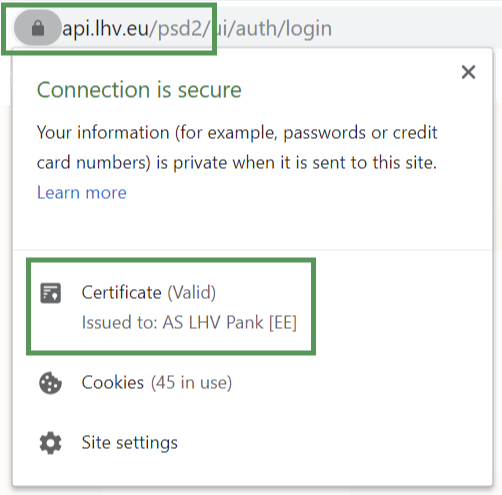
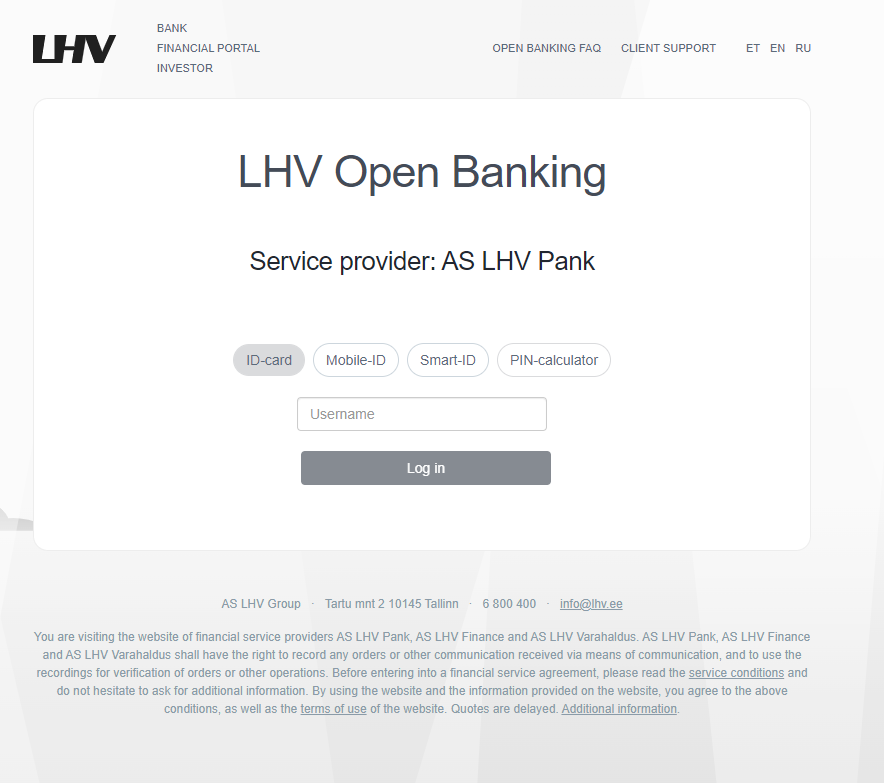
Examples of the LHV open banking page
First-time user authentication. This window is needed for both the service provider and the bank to know who the account holder is and who is communicating with the system. Depending on the service provider, the application can remember the information for 90 days, so the window may not be displayed every time.
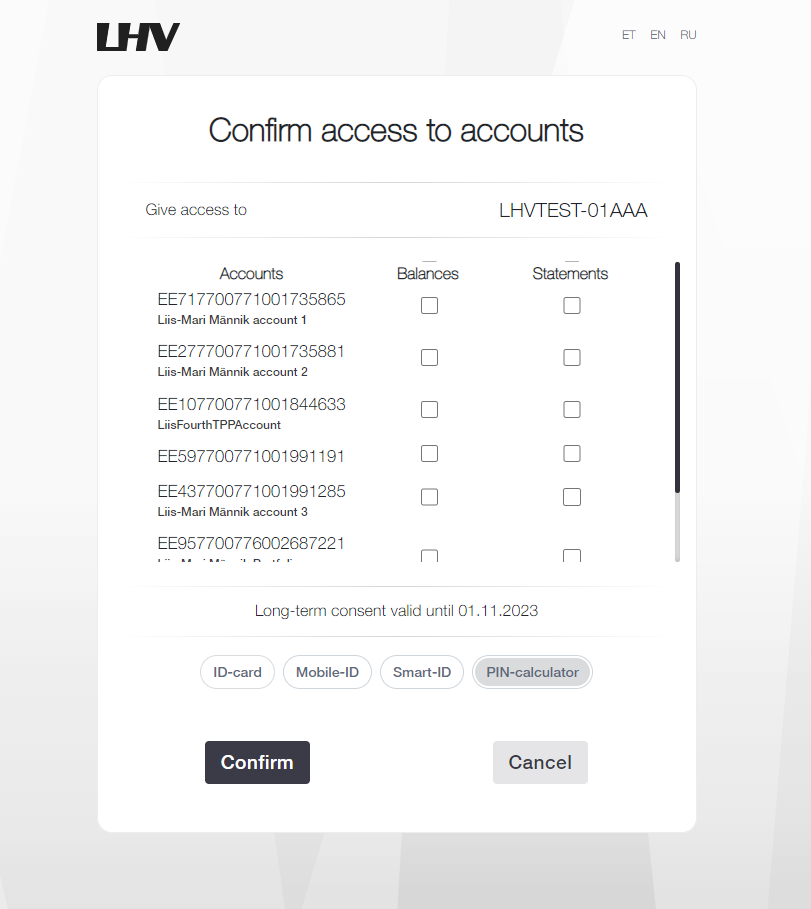
Allowing access to accounts. This window is needed for the customer to let the service provider and the bank know which accounts he or she holds. Access can be granted separately for accessing account balance, account statements or both. It depends on the service provider how it uses these data. For example, a provider of a payment service needs the window above all for querying the list of the customer’s accounts to know which accounts payments can be made from. Unless the payment institution itself has given precise instructions as to which rights are required, it is usually sufficient to indicate “account balances” in the account from which the payment is to be made. The payment confirmation and execution window is displayed separately.
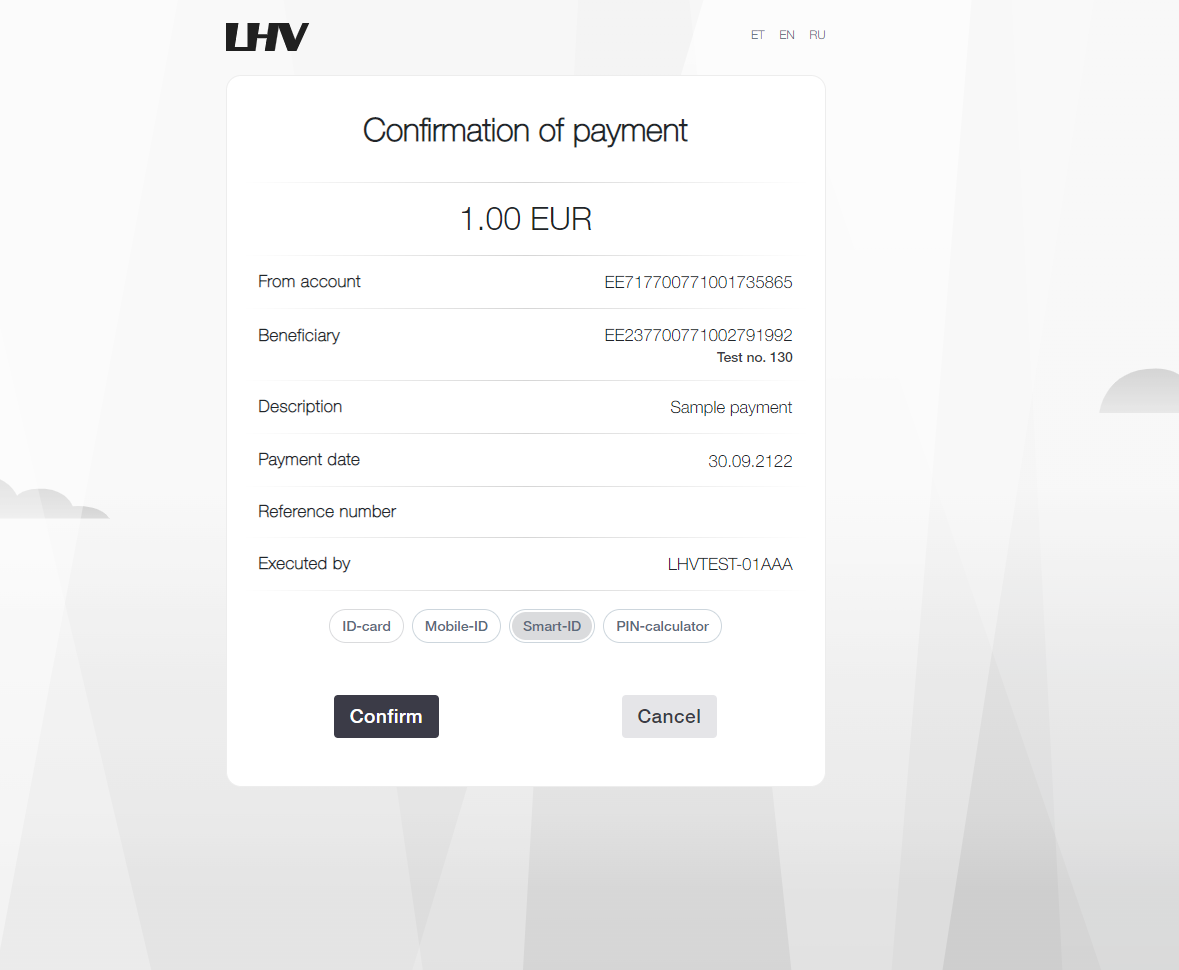
Payment confirmation. In the same window, the customer confirms the payment the service provider and the customer wish to initiate. All parameters (customer’s account, recipient’s account, amount and details) come from the service provider’s system and the LHV window is to allow the customer to grant or deny consent for this.
The service providers operating in the context of the open banking ecosystem and PSD2 have received permission to do so from the Estonian Financial Supervision Authority. The service providers are issued certificates that enable use of the open banking API.
The service provider can offer its customers a wide variety of services for which data transmitted through open banking are used in various ways. New services and business models are continually being developed in this field. It is important for service providers to provide sufficient explanation to customers what the customer entitles it to do.
You can rescind open banking consent in the service provider’s system – the rules are such that it cannot be done directly in the bank’s systems. Only if you have communication problems or suspicions about legitimacy involving a service provider should you also contact the bank. The same applies to payments: if a payment went through in the incorrect amount or to the wrong recipient or there were other problems, first try to resolve the problem with the service provider. Please contact the bank only if this is unsuccessful.
This is a security-enhancing feature based on data from TTJA – the Estonian Consumer Protection and Technical Regulatory Authority. The TTJA blacklist is a public register of companies and individuals who have failed to comply with the decisions of the Consumer Disputes Committee.
LHV uses this information in open banking (PSD2) payments to help clients make more informed decisions before confirming a payment. If the payee is listed in the TTJA blacklist, an informational warning is displayed before the payment is confirmed. The client can always choose whether to proceed with the payment or cancel it.
The purpose of the TTJA blacklist check is to help prevent potential fraud and increase customer awareness.
More information about the TTJA blacklist: ttja.ee/en/blacklist
Proxy payment
Proxy payment is a payment made by entering the recipient’s phone number. Proxy payment can be used to pay individuals or legal persons.
Start a proxy payment in the LHV app just as you would an ordinary payment. If you allow the app to access your Contacts, you can select the recipient conveniently from the contacts you have saved on your phone.
Good to know: If the payment recipient has already joined the proxy payment service, their name and bank account number will automatically appear on the payment order.
Proxy Payment can be used to pay individuals or legal persons. If the recipient has not started using the service you can invite them over the LHV app.
Yes, to do this; link your company’s mobile phone number with the corporate account. Remember that a given phone number can be associated with only one account for proxy payment. The last number linked with the account remains in place.
No, one phone number can refer to only one bank account. If you have more than one account at LHV, but only one phone number, select the account where you would like the funds to be received.
Your phone number can only refer to only one bank account at a time. If you’ve activated the proxy payment service in several banks with the same mobile phone number, the last account you associated with the number with will be the active one.
This poses no hindrance to using proxy payment. Any LHV account can be associated with as many phone numbers as you wish. The only limitation is whether the phone number supports receiving of text messages, as a security code is sent to the phone for making the payment.
You can use phone numbers in any country that support receiving and displaying text messages.
No, proxy payment works between all banks that have joined the Latvian central bank administered service Proxy Registry Instant Links. The largest banks in Estonia and Latvia have joined the service as of now. View the list of banks that have joined
Yes, proxy payment works between all banks that have joined the Latvian central bank administered service Proxy Registry Instant Links. The largest banks in Estonia and Latvia have joined the service as of now. View the list of banks that have joined
The usual limits and rights for transactions also apply to proxy payment.
The association between phone number and bank account can be deleted in the app.
Yes, this can be done. A child of at least 13 years of age can join proxy payment on their own. Younger children can ask a parent or guardian with access to their account to enable the service. To do this, the adult should log in to the LHV app and associate the child’s account with the child’s phone number.
We ask access so that the payment recipient could be chosen conveniently from your contacts. We send only the phone number of your selected contact to the registry for making the proxy payment. All other data remain in your device and they cannot be viewed by LHV or the proxy payment register administrator.
Group payment
A group payment is a payment between LHV Pank and LHV Bank accounts, which can be made immediately, similar to an instant payment, regardless of the time of day and day of the week. The group payment currency is GBP.
Salary Payment
Salary Payment is a service created in cooperation between LHV and the Estonian Tax and Customs Board (ETCB) that allows you to calculate the related tax obligations simultaneously with the salary transfer, pay the taxes, and automatically submit the data to the ETCB TSD declaration.
Supported payment types:
- salary,
- management board member’s fee,
- sickness payment,
- Payment for provision of services (not employment),
- minimum social tax obligation payment.
The service is free of charge for LHV business customers.
For more information about the Salary Payment service, please visit the ETCB website.
Before using the service for the first time, the Salary Payment terms and conditions will be displayed in LHV internet bank, which must be accepted to activate the service.
The following rights are required to make a Salary Payment:
- Internet bank rights:
- The LHV internet bank user must have 100% payment confirmation rights on the company account.
- Access rights in the e-MTA environment:
- Machine interface access right “Submitting payment data via X-tee” (code APA_PAYMENTS_XROAD): this right must be granted to LHV Pank AS (registrikood 10539549) by a company representative in the e-MTA environment.
- Accountant package in the e-MTA environment: this package must be granted to the user themselves (or their accountant). This right is needed to view, modify, and submit the TSD data in the e-MTA environment.
* More detailed information on granting e-MTA rights can be found on the ETCB website.
Navigate in internet bank: Daily banking → Payments → Salary payments → Add new.
- Enter the data: Select the payment basis, fill in the employee details, and enter the amounts. The system will send a query to the ETCB to determine the tax obligation and display it in the “state taxes” field.
- Select the tax payment time: Decide whether you want to pay the taxes immediately or later. If you choose deferred payment, a future payment will be created for the tax amount, with a due date on the last business day before the state tax receipt deadline.
- Confirm or save the payment:
- To pay immediately: Confirm the payment with your PIN code. This initiates the transfer to the employee and the ETCB and submits the data to the TSD in e-MTA.
- To save for later: Saved payments are added to the salary payments list. To make a new payment, tick the checkbox next to the desired payment in the list (the system will automatically request updated data from the ETCB), click “Pay selected” and confirm the payment with your PIN code.
If there are any errors in the payment data, the user who confirmed the payment will be notified by email. The declaration data can be reviewed and corrected in the e-MTA environment.
No. Salary Payment submits the payment data to the e-MTA environment, where it is entered into the TSD declaration, but the declaration must be confirmed separately in e-MTA. This should only be done after all monthly payments have been entered into the declaration. The TSD submission deadline is the 10th of each month.