Other topics
Establishment of a customer relationship
Steps for becoming a private client of LHV:
- Fill in the account opening form at LHV mobile app or internet bank
- identify yourself
- without leaving home, electronically through internet bank or
- at an identification point near you – please bring with you a valid identity document.
- sign the agreement
- As soon as you have identified yourself, you can sign the customer contract in LHV’s Internet bank or mobile app. You will need a valid ID card with ID card reader, mobile-ID or Smart-ID.
Steps to becoming a business client at LHV:
- fill in an application for opening an account. It can be found by accessing the OPEN AN ACCOUNT link, and selecting the “Register as the representative of a legal person” option button
- identify yourself in an LHV office or an identification point near you:
- please bring with you a valid identity document.
- if you opt to identify yourself at an identification point near you, please let us know in advance via info@lhv.ee or 6 800 400. We will then send you a client agreement so that you can digitally sign it.
- sign the agreement
- if desired, you can also sign the client agreement at our customer office.
We have decided to stop onboarding companies whose beneficial owners are Russian or Belarusian citizens without a valid European Union residence permit.
In order to transfer your salary to your LHV bank account, you should fill in the salary transfer application. Sign it digitally and send it to an accountant at your place of work.
You can also conveniently transfer your other income, such as pension or child benefit, to your LHV bank account. To do this, fill in the application for pension transfer or child allowance transfer, add your digital signature and send it to info@sotsiaalkindlustusamet.ee. In case you want to submit the application manually then print the pension or child allowance transfer application out, fill it and sign, then send it to the Social Insurance Board via regular mail to the address Paldiski mnt 80, Tallinn 15092.
We consider the following activities to be high risk:
- Financial services and credit institutions, including
- Creditors
- Credit intermediaries
- Investment unions
- Investment funds
- Fund managers
- Crowdfunding
- Credit cooperatives
- Payment service providers, including
- E-money institutions
- Virtual asset service providers
- blockchain-driven fund-raising (ICOs)
- Currency exchange
- Cash intensive businesses
- Trust and company services
- Pawnbroking services
- Embassies
- Mining
- Trade of precious metals and gems
- Freight rail transport
- Production and trade of strategic goods
- Gambling
- Cross-border philanthropy
- Affiliate marketing for a high risk business field
- In the internet bank select Information and settings → Settings → Active sessions
- In the mobile app, tap the profile icon in the page header → Settings → Security and privacy → Active sessions.
Bank statement and other details
You can obtain your account statement from the LHV internet bank. After entering, select “Assets and Liabilities” ➞ “Account Statement” from the menu on the left.
Select the account and the period for which you need the account statement. Then, press the button “Update Statement” and save the statement in ASICE format.
To receive an overview of the fees you have paid, please send your request to info@lhv.ee. Be sure to specify which account and which time period the overview should cover.
The compiled document will show information about the service fees related to your current account (e.g. transfer fees, card monthly fees, cash withdrawals, etc.). It will also display any interest you may have paid or earned during the selected period.
Please note that the overview does not include information about loan interest required for income tax reporting or transactions related to investments.
You can also access the same information immediately as individual transactions by downloading a filtered account statement from LHV Internet Bank. After logging in, go to the left-hand menu and select “Assets and liabilities” ➞ “Account statement” ➞ “Open filter.”
You can change your contact details both in Internet Bank and in the app.
To change your details in Internet Bank, select Info and settings → Data from the left-hand menu.
For changing your details in the app, please see further instructions on the website.
Verifying your e-mail address is optional, but we strongly encourage you to do so. This way we can be sure that this e-mail address belongs to you and you will not miss any important information. Each e-mail address can only be verified once.
To verify your e-mail address, log in to your account and select Information and Settings → Data from the left-side menu:
-
Check your e-mail address. If necessary, you can update it before sending the verification e-mail on the same form. To do so, enter a new e-mail address and press the “Sign” button.
-
To send the verification e-mail press the “Send verification e-mail” button, after which we will send an e-mail to your e-mail address with a verification link that is valid for 24 hours.
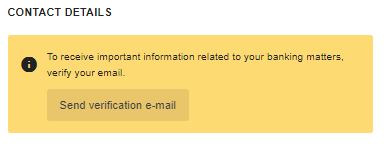
- By clicking on the “Verify” button in the e-mail, your e-mail address will be verified. Then, a blue icon will appear next to the e-mail address field in the internet bank contact details, indicating that the verification was successful.
If you didn’t receive the verification e-mail, please check your spam inbox first. If you still can’t find the e-mail, make sure the e-mail address in the contact details is correct and click again on the “Send verification e-mail” button on the data change form. If the problem persists or verification fails for any other reason, please contact our customer support.
We’re glad you’re using our self-service options – they’re designed to make your work smoother and give you more time for what truly matters. As a bankruptcy trustee, you can conveniently handle many daily tasks on your client’s (debtor’s) account directly in the LHV Internet Bank. You’ll find instructions for the most common situations on bankruptcy trustee page.
General information about services
We offer various kinds of solutions for private and business clients. For more information, visit our website to learn more about loan options for private clients and business clients.
We offer business loans and overdraft facility to companies, and private loans and consumer loans secured by real estate to private persons. In addition, both companies and private persons can take a loan secured by securities. With the help of LHV leasing, you can purchase a vehicle you need, as well as heavy equipment and other devices. To make a purchase of any size, you can use the hire-purchase option or apply for a credit card.
If interested read more
For more information, call our customer support at (+372) 6 800 400 or write to info@lhv.ee
To exchange currency, enter the internet bank and select “Currency exchange” under “Everyday banking” on the left. Then, determine the
-
source currency, i.e. the currency you are using at the moment and that you wish to exchange with another currency:
-
target currency, i.e. the currency you wish to obtain as a result of the exchange.
In the account view, we use the exchange rate of the European Central Bank.
For currency exchange, we use the current market rate (buy or sell rate, respectively), which you can check using the LHV currency calculator.
LHV Bank Limited specialises in providing Retail Banking for UK consumers, SME Lending solutions for UK businesses, and Banking Services for global fintechs.
LHV Bank’s Retail Banking, with a digital-first approach, delivers a competitive market leading interest rate on all current accounts as standard and competitive savings accounts.
The SME Lending division offers trading, commercial real estate investment loans and specialist buy-to-let loans from £0.5m to small and medium-sized businesses in the UK.
As a leading Banking Services provider, LHV Bank Limited enables its clients to reach 500 million end-customers across the UK and Europe. Its Banking Services are used by over 200 international clients, serving tens of millions of end customers.
LHV Bank Limited maintains a strong financial position. It is well-capitalised through its listed parent company and well-funded through partnerships with deposit aggregators. This financial stability ensures that LHV Bank Limited can continue to provide competitive lending solutions and support to the businesses in the UK.
Withdrawal from an agreement via electronic channels
As a consumer, you have the right to withdraw from a financial services agreement concluded by electronic channels (in the internet bank or mobile app) within 14 days of concluding the agreement, without having to provide a separate reason.
Exception: for a loan related to residential property (for example, a home loan), the withdrawal period is 7 days instead of 14 days.
The right of withdrawal does not apply to agreements for investment and crypto asset services or to agreements that you have concluded on behalf of a company.
You can submit a notice of withdrawal during the withdrawal period in three ways:
- via the withdrawal function available in the agreement details in the internet bank or mobile app;
- by email at info@lhv.ee;
- in person at an LHV office.
The most convenient option is to use the withdrawal function available in the internet bank or mobile app.
You can find the withdrawal function in the Agreement view. There you can:
- review your name and contact address and enter the details of the agreement from which you wish to withdraw;
- click the “Submit application” button.
After you confirm the notice of withdrawal, we will immediately send you an email showing the date and time when the notice was submitted, as well as the content of the notice of withdrawal.
A notice of withdrawal is considered to have been submitted on time if you have sent it within the 14-day period (7-day period for a loan related to residential property). What matters is the date on which the notice was sent, not the date on which it is processed by LHV.
When withdrawing from an agreement, you must immediately return to LHV all funds and other means that you have received for using the service. LHV is entitled to charge the fee specified in the price list for any service or transaction that has already been provided or carried out for you before the withdrawal. Please note that the card issuance and delivery fees will not be refunded to you in the event of withdrawal.
If you withdraw from a credit agreement, you must repay the principal amount of the credit and pay the interest accrued on the principal until it is repaid.
If your card also includes insurance and you have submitted an insurance claim, the claim will not be settled if you withdraw from the card agreement. If an insurance indemnity has already been paid to you, you must return the indemnity received to LHV Kindlustus within 30 days.
The law requires LHV to send you a separate reminder within 1–7 days after concluding the agreement about the existence of the right of withdrawal and the procedure for exercising it (if you did not have the opportunity to review the agreement and the related information one day before concluding the agreement). The purpose of the reminder is to give you the opportunity to review the agreement and the related information at your own pace and consider whether you wish to continue with the agreement under these terms.
You will not receive a reminder if you have already terminated or withdrawn from the agreement by that time.
Termination of customer relationship
There are three options to terminate your client agreement:
- Submit an application in the mobile app (tap the profile icon in the header → Settings → Agreements → Terminate client agreement);
- Send a digitally signed application to info@lhv.ee;
- Submit an application at our branch.
After submitting the application, an employee of LHV will contact you to specify further steps.
LHV processes (incl. deletes) customer data pursuant to the Principles of Processing Customer Data. A request for deleting the data can be sent to info@lhv.ee.
A funeral allowance is a one-time support to cover expenses related to organizing the funeral of a deceased loved one.
If a client of LHV has died, we will pay the funeral allowance to the deceased client’s heir, a close relative or a close person who is organizing the funeral. Funeral expenses can only be covered with available funds in the deceased customer’s account (in euros). The maximum amount we can pay out on the basis of funeral expenses invoices is 3,000 euros and with just one payment.
The applicant must contact the bank no later than 30 calendar days after the client’s death (later, the money in the account becomes part of the estate).
In order to be able to pay out the funeral expenses, the applicant must come to the bank office with a valid identity document.
The applicant must also bring the following documents:
- death certificate;
- will, if it has been made;
- invoice(s), evidence of funeral arrangements.
Requesting a funeral allowance via email is also possible if the person who organized the funeral has been identified and all the necessary documents can be sent digitally to the email address info@lhv.ee.
If it turns out that the deceased person has no relatives and a third party (for example, a neighbour) deals with his burial, then the invoices for the funeral expenses are sufficient. It is essential that the invoices are issued in the name of the person who is organizing the funeral.
Account Security
Multi-factor authentication (MFA) is like a door with two locks: in addition to your username and PIN1, we also ask you for another confirmation (for example, an SMS code or a prompt via the LHV mobile app). This way, your account stays protected even if someone gets hold of your username or PIN1.
To give your account and funds even stronger protection. Extra security is necessary because fraud attempts are becoming more common. Scammers try to gain access to bank accounts using convincing fake emails, messages, and phone calls. Unfortunately, these scams are often very well put together, so in a busy moment, someone might enter their PIN thinking they’re confirming an action, but in reality they’re giving access to a fraudster’s device. Multi-factor authentication adds an important safeguard that helps reduce this risk and protects your money and data.
Not always. The need for extra authentication depends on several factors. For example, it may be required when you log in from a new device.
In that case, you won’t be able to log in to internet or mobile banking during that session.
When extra authentication is needed, you can choose how to receive your code. For example, we can send it to your mobile phone via SMS, or as a push notification if you’re using the LHV mobile app.
To make sure you receive the code without issues:
- If you choose SMS, ensure your phone has mobile coverage.
- If you choose push notifications, make sure you have enabled notifications on your device (e.g. smartphone). You can check this in your phone’s Settings under notifications.
Good to know: with the LHV mobile app, security codes are delivered as push notifications even if you’ve disabled push notifications inside the app itself (for example, for marketing). What matters is that push notifications are enabled in your phone’s settings, otherwise the code won’t reach you. Also, always make sure you’re using the latest version of the LHV app, which you can check and update in the App Store or Google Play.
Don’t worry – we’ll guide you through each step when extra authentication is needed (for example, when logging in). The 4-digit code you receive is one-time only and can be entered into the designated field. If the code is correct, you can continue with your action. If the code is incorrect or you make a mistake while entering it, you can request a new code.
It’s important to keep your details up to date so we can reach you quickly if needed. For multi-factor authentication, having the correct mobile phone number ensures you can receive your code by SMS without issues.
To check your contact number:
- In internet banking, go to Information and Settings → Data.
- In the mobile app, open the menu and select My data.
You can download the LHV app from the App Store or Google Play. It’s free and ready to use in just a few taps.
If you need help, please contact our customer support at +372 6 800 400.