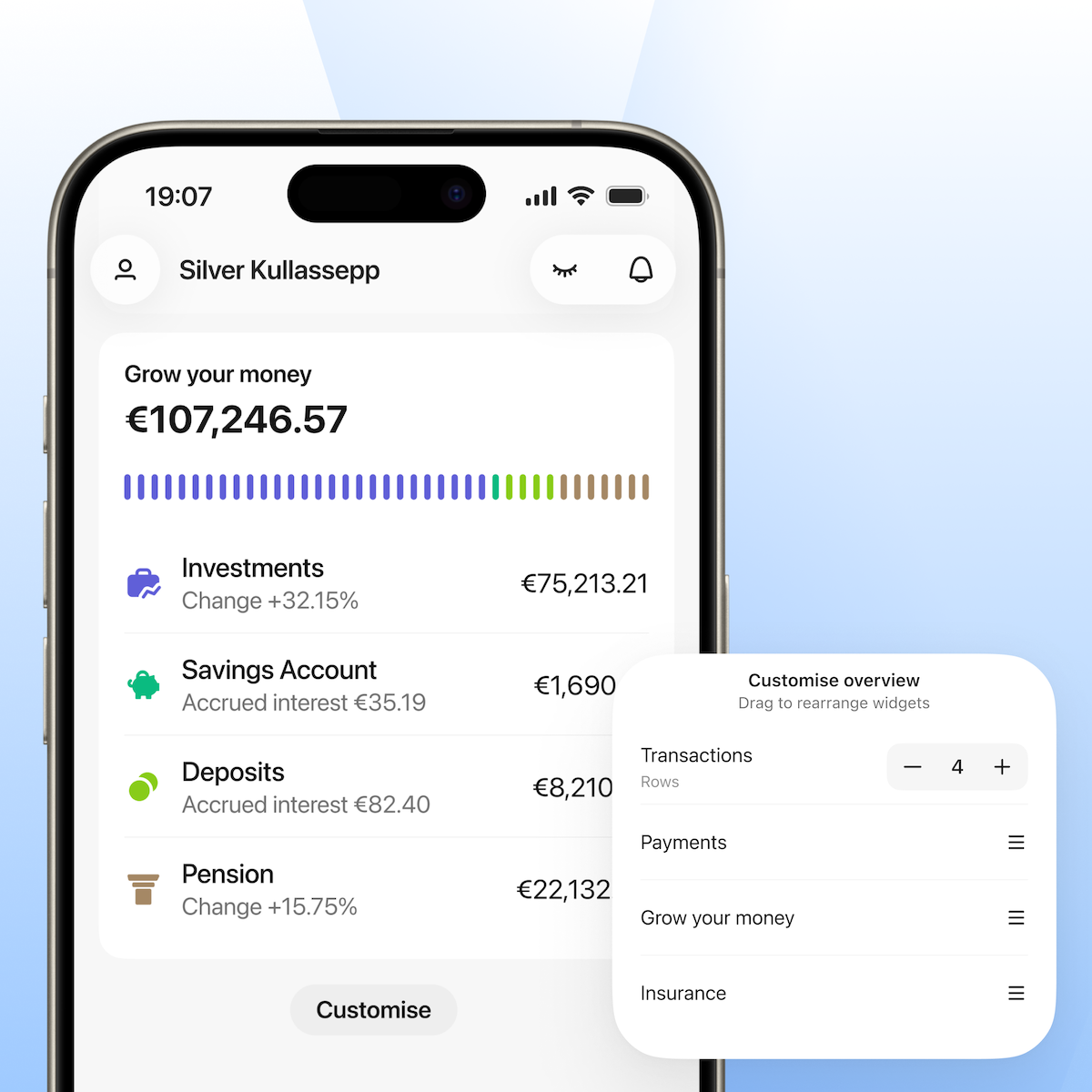
We’re making a few updates to the LHV mobile app so you can find what you need faster and get a clearer overview of your finances in one place.
A bit of background
A while back, we introduced the Grow tab with a clear idea: your financial wellbeing isn’t just about one product. Your savings, investments, and pension don’t exist in isolation. They work together. Depending on where you are in life, you might be building a safety net, growing your portfolio or planning for retirement. We wanted the app to reflect that connection.
That thinking still stands. What has changed is how we bring it to life in the app.
What’s changing
The Grow tab is becoming the Investments tab.
The new name reflects what you’ll find there: your investment portfolio, including securities, crypto and your Growth Account. You’ll continue investing in the same way.
The rename also gives this part of the app room to grow. There’s more to come, including new ways for you to explore and manage your portfolio. A dedicated tab gives these improvements a clear foundation.
The Grow concept finds a new home
The Grow mindset means seeing your savings, investments and pension as parts of a whole. This wider perspective now lives on your Home tab as the new Grow widget.
The widget brings together your Investments, Savings Account, Deposits and Pension in a single view, so you can see your total assets at a glance or open any area for more detail.
Where to find Savings and Pension
You can now access your Savings Account and Pension through the Grow widget on your Home tab. This lets you check your Savings Account or pension balance without opening another tab.
A note on pension investment accounts (PIK)
If you have a PIK account, you can currently find it in the Investments tab while we create new Pension views for II and III pillars and PIK. Once they’re ready, everything related to your pension will live in one place within the Grow widget. The Investments tab will then focus solely on investing.
We’ll let you know when the update rolls out.
Other improvements
The Home tab has also had several improvements, the first being a refreshed design for the smaller widgets. Alongside the brand-new Grow widget, we’ve combined the Payments widgets into one.
Second, you can now decide the order of information on your Home tab. Just tap Customise at the bottom of the tab and drag selected widgets into the order you prefer. You can also choose how many transactions are visible in the Transactions widget, between one and eight.
To use the new LHV mobile app, download the latest version from the App Store or Google Play.
For urgent matters, please contact our customer support.

 A little-known option: a young person can take out their first home loan with the help of their parents10. october 2026Financial wisdom/Banking/Youth Bank
 Before taking out a home loan, give it a trial run for a couple of months01. october 2026Youth Bank/Banking/Financial wisdom/Economy